-
Hosted PayPal checkout
-
Card payments supported
-
Smooth EDD integration
-
PCI compliant processing
-
Custom checkout form
-
Fast, secure transactions
-
Auto payment validation
-
Built in fraud protection

Sign in
Login
Register
Wishlist
Please, enable Wishlist.
Compare
Please, enable Compare.
Wishlist
Please, enable Wishlist.
Easy Digital Downloads PayPal Payments Advanced
8,00$
31 people are viewing this product right now
🔥 12 items sold in last 3 hours
Easy Digital Downloads PayPal Payments Advanced is the perfect solution for WordPress users who want a simple, professional, and secure way to sell digital products online. This integration connects your Easy Digital Downloads store directly with PayPal’s advanced payment system, allowing you to accept credit card and PayPal payments right on your website without sending customers to an external PayPal page.
It is built for creators, entrepreneurs, and digital product sellers who want a fast checkout process, a trustworthy payment gateway, and a seamless buying experience that looks and feels like their own brand.
Why Choose PayPal Payments Advanced?
PayPal is one of the most trusted payment processors in the world and with PayPal Payments Advanced, you get the best of both worlds
The credibility and security of PayPal
The customizable, on site checkout experience your brand deserves
Instead of sending your buyers to PayPal’s website, this gateway lets them complete their purchase right on your store’s checkout page.
That means fewer steps, less confusion, and higher sales conversions.
Key Features & Highlights
1. On Site, Seamless Checkout
Keep your customers on your website from start to finish. The integrated PayPal hosted checkout form appears as an embedded iframe on your site, maintaining your store’s look and feel.
2. Fully Secure & PCI Compliant
Enjoy the peace of mind that comes with PayPal’s PCI DSS compliant payment processing. Sensitive payment details never touch your server PayPal handles it all securely behind the scenes.
3. Multiple Payment Methods
Offer your customers flexibility by accepting
- Credit Cards (Visa, MasterCard, American Express, Discover)
- Debit Cards
- PayPal Account Payments
4. Built In Reporting & Refunds
Monitor all your transactions, sales, and refunds directly from your EDD dashboard. Detailed reports help you stay on top of your business performance without juggling multiple accounts.
5. Simple Setup & Configuration
Setting up the gateway is straightforward
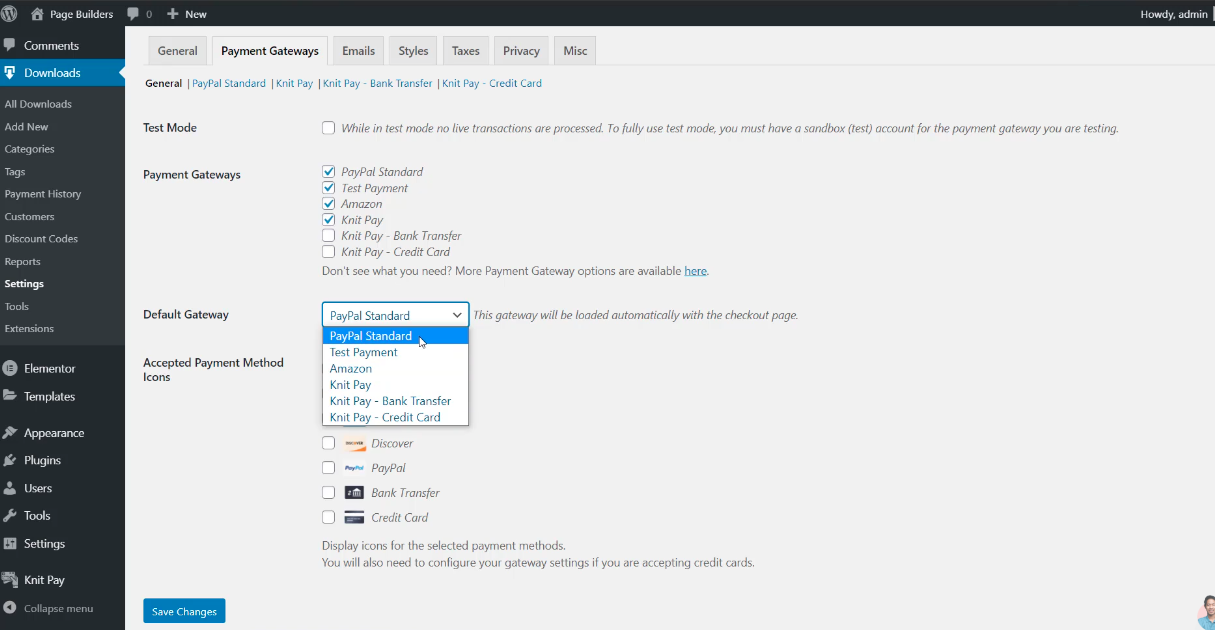
- Enable the PayPal Payments Advanced extension in your EDD settings.
- Add your PayPal API credentials.
- Customize your checkout experience colors, logo, and layout.
- Start accepting secure payments instantly.
6. Works With Other EDD Extensions
This plugin is fully compatible with other EDD addons
- Recurring Payments
- Software Licensing
- MailChimp Integration
- Discount Codes
- Download Monitoring
Technical Specifications
| Feature | Details |
| Plugin Type | Payment Gateway Extension for Easy Digital Downloads |
| Platform | WordPress |
| Checkout Type | Embedded (iframe) |
| Processor | PayPal |
| Account Required | PayPal Payments Advanced |
| Compliance | PCI DSS Level 1 |
| Supported Currencies | All PayPal supported currencies |
| Transaction Types | Sale, Authorization, Capture, Refund |
| SSL Certificate | Strongly Recommended |
| API Interface | PayPal Manager |
| License | Premium (Annual Subscription) |
Benefits for Digital Sellers
- Improved User Trust: Customers stay on your site no redirects or confusing pages.
- Faster Checkout Process: Reduced friction means more completed purchases.
- Accurate Sales Reporting: Integrated analytics keep your business performance visible.
- Full Refund Support: Manage refunds effortlessly from your WordPress dashboard.
- Complete Integration: Works perfectly with all major EDD extensions.
- Professional Presentation: Keep your checkout branded and cohesive to your store’s design.
Pricing & Licensing
The Easy Digital Downloads PayPal Payments Advanced extension is available as a premium addon from the official EDD marketplace.
- License Type: Annual subscription
- Includes: 1 year of updates & customer support
- Requirements: Active PayPal Payments Advanced account
- Optional: Developer license for multi site or client usage
Ideal For
- Online entrepreneurs selling digital downloads or memberships
- Software developers offering plugins or SaaS subscriptions
- Content creators selling eBooks, art, or digital assets
- Businesses looking for a professional grade payment system on WordPress
Installation & Setup
- Purchase & Install: Download the PayPal Payments Advanced extension from Easy Digital Downloads.
- Activate: Upload it to your WordPress site and activate via the Plugins menu.
- Configure:
- Go to Downloads → Settings → Payment Gateways
- Select PayPal Payments Advanced
- Enter your PayPal Manager API credentials
- Save settings
- Test Payments: Use PayPal’s sandbox to test before going live.
- Launch: Start selling your digital products with a secure, on site checkout.
Security & Compliance
- All transactions are handled through PayPal’s secure servers, ensuring that sensitive financial data is never stored on your site.
- Full SSL encryption is supported, and PayPal’s infrastructure maintains strict PCI DSS Level 1 compliance.
- Ideal for businesses seeking a trusted, regulation compliant payment experience.
Supported Regions
PayPal Payments Advanced is available in
- United States
- Canada
- Select International Markets where PayPal merchant accounts are supported.
Example Use Case
A digital artist uses Easy Digital Downloads to sell design templates. With PayPal Payments Advanced, customers can pay using credit cards directly on the site no redirections. The artist’s checkout page matches their brand colors and logo, resulting in higher buyer trust and fewer cart abandonments.
Final Thoughts
The Easy Digital Downloads PayPal Payments Advanced extension is perfect for anyone serious about selling digital goods online.
It brings together
- The simplicity of EDD
- The trust of PayPal
- The power of an embedded checkout experience


Related products






You may add any content here from XStore Control Panel->Sales booster->Request a quote->Ask a question notification
At sem a enim eu vulputate nullam convallis Iaculis vitae odio faucibus adipiscing urna.
Reviews
There are no reviews yet.